
Plan every bill around your paychecks.
Paycheck2Paycheck matches each bill to the paycheck that pays it. You see a short paycheck coming before payday, not after, and know exactly what's safe to spend.
Free to use. No bank connection needed to start.
How it works
Your budget, one paycheck at a time
If money lands every week or two but bills come due on fixed dates, a monthly budget can look fine while one paycheck comes up short. Paycheck2Paycheck plans it the way it actually happens.
Add your paychecks and bills
Type them in, or connect your bank and let it find them. Don't know a bill's amount or due date yet? Mark it "not sure" and fill it in later.
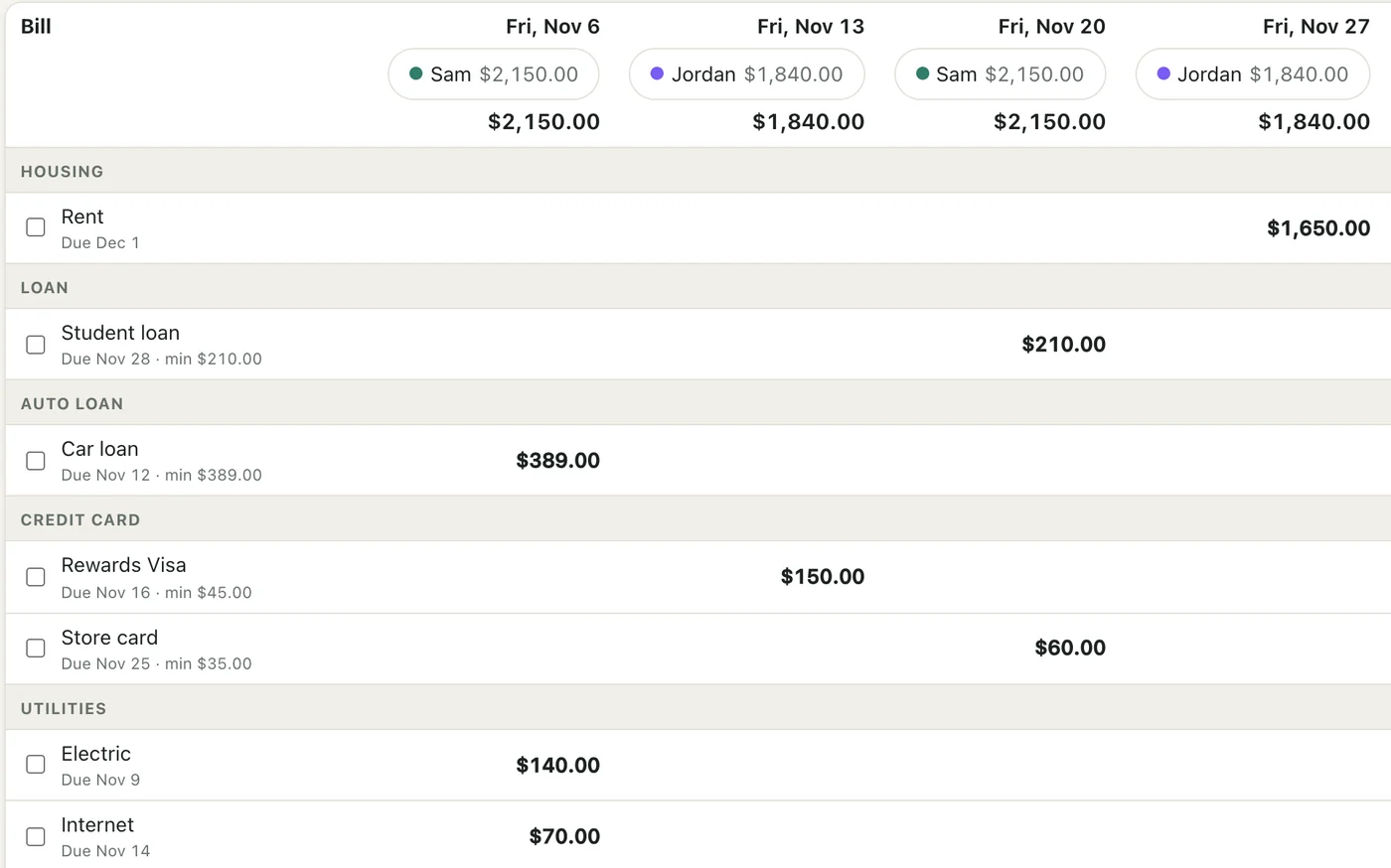
Each bill gets its paycheck
Every bill is paid by the latest paycheck before it's due. Leftovers carry forward, so you see exactly where each dollar goes.
Follow the payday checklist
When money lands, the Payday playbook lists what to pay, what to move and what to set aside. Tick it off and you're done.
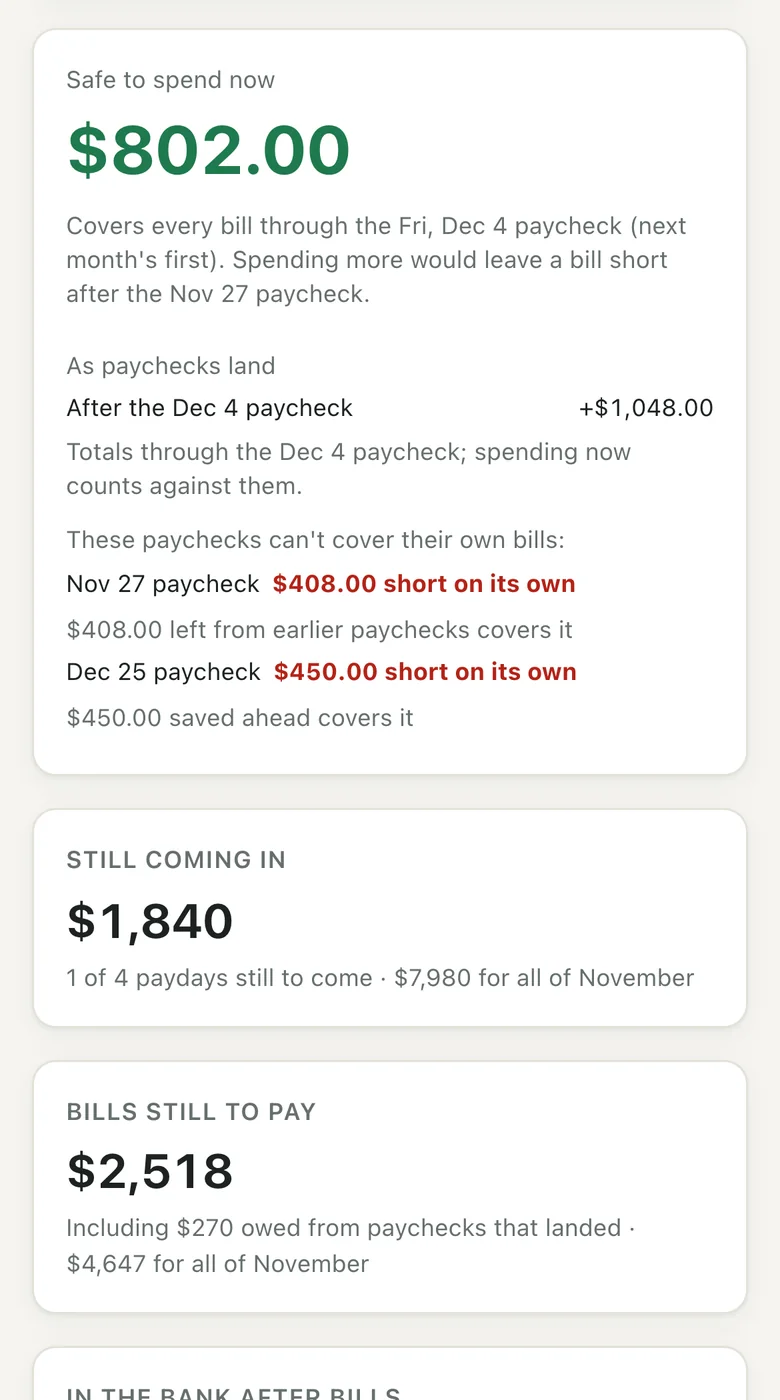
Safe to spend
Know what's really yours to spend
One number that already counts every bill coming before your next paychecks land. Spend that, and nothing comes up short.
- Short paychecks show up weeks ahead, with how much and why.
- Ways to close a gap: move a bill to another paycheck, pause one, or ask a lender for a new due date.
- "Even out my paychecks" rearranges bills so no payday runs too thin, without making anything late.
Payday playbook
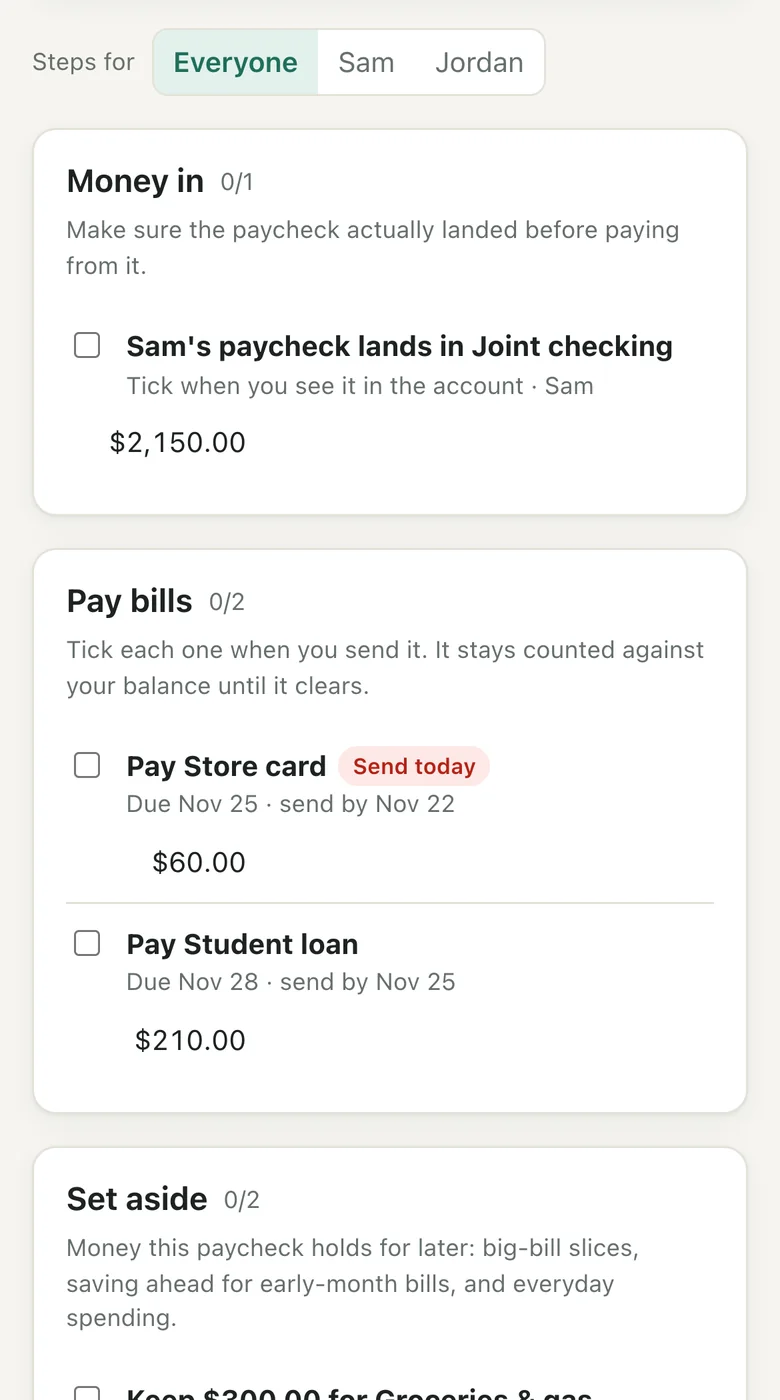
A checklist for every payday
No more guessing what to do when a paycheck lands. Each payday becomes a short, ordered list, filtered to just your part if you share a household.
- Confirm the paycheck landed, then pay the bills it covers, with "send by" dates.
- Set aside slices for big bills like rent, plus groceries, gas and savings.
- A payment counts against your balance until it clears, so nothing is counted twice or missed.
Everything in one place
Made for real households
Two earners on different schedules, a roommate who chips in, a relative who helps each month: one plan covers all of it.
Shared with your household
Everyone sees the same plan on their own phone or computer. Each person can filter to just their paychecks and bills.
Settle up
Split shared bills by income, evenly or your own way, and see who owes whom each month.
Every kind of bill
Monthly, every other month, yearly or one time. Pause a bill and pick when it resumes. Grace periods count too.
Several accounts
Joint and individual checking each get their own projection. Paychecks land where they really land.
Side income and weekly spending
Log side gigs as they land. Give groceries and gas a weekly amount and watch "left this week" count down.
Pay down debt
Send the safe extra on payday to the debt your strategy targets, and see your balances shrink.
Paycheck2Paycheck Plus
Let your bank fill in the plan
Plus connects your bank and cards so the numbers keep themselves current. One subscription covers everyone in your household.
Connect banks and cards Plus
Balances, minimum payments and due dates fill in on their own, through Plaid. You sign in on your bank's own screen.
Bills that check themselves off Plus
When a payment clears or a paycheck lands, it's marked for you. It even spots bills you paid but forgot to tick.
Bank alerts Plus
A heads-up when there's new activity, and your plan refreshes. Alerts never show amounts or names.
AI debt coach Plus
Ask about payoff options and get answers worked out with your own numbers. Names are hidden by default, and you see what it receives first.
Setup that fills itself in Plus
Connect a bank during setup and it finds your paychecks and regular bills, so there's less to type.
One plan, whole household Plus
When one owner or full member subscribes, everyone in the household gets Plus.
Private by design
Your budget is locked on your devices
Your income, bills and debts are exactly the kind of information that should stay private. So we built Paycheck2Paycheck so that we can't read it.
- Encrypted before it syncs. Our server only stores a locked copy, and we don't have the key.
- No ads and no trackers. We don't sell your information or follow you around other apps.
- Your bank password stays with your bank. Bank data goes to your devices; our server passes it along without keeping it.
- You decide who's in. The household owner approves every person and device, and what each one can see.
Pricing
Free to plan. Plus when you want your bank in it.
Free
$0
Everything you need to plan by hand
- Paycheck plan, Safe to spend and the Payday playbook
- Ways to close a gap and Even out my paychecks
- Balances you type in, for any number of accounts
- Encrypted household sync across your devices
- No account needed to try it on one device
Plus
$9.99 a month
or $59.99 a year: save 50%
- Everything in Free
- Connected banks and cards
- Paid bills and paychecks marked for you
- Bank alerts
- The AI debt coach
- One subscription covers everyone in your household
Plus is sold in the iPhone app, coming soon to the App Store, and works on the web too. Prices in US dollars; the App Store shows yours before you buy. Cancel anytime in your iPhone's settings.
Questions
Good to know
Do I have to connect my bank?
No. Everything works with numbers you type in. Connecting a bank is part of Plus and saves you the typing: balances, minimums, due dates and cleared payments come in on their own.
Who's it for?
Anyone paid weekly, every two weeks or twice a month, with bills on fixed dates. It's especially handy for households with more than one paycheck, or someone who chips in.
Does it pay my bills or move money?
No. Paycheck2Paycheck plans and reminds; you make the payments yourself, the way you do now.
Can my partner use it too?
Yes. Invite them to your household and you'll both see the same plan on your own devices. A relative who only needs their part can get a summary of just that.
Can you see my budget?
No. It's encrypted on your devices before it syncs, and we don't have the key. Read the details in our Privacy Policy.
Is this financial advice?
No. Paycheck2Paycheck is a budgeting tool. Plans are estimates based on your numbers, and the AI coach explains options rather than telling you what to do.
When is the iPhone app coming?
Soon. Until then, the web app works in any browser, and on iPhone you can add it to your Home Screen from Safari.
See your next paycheck before it lands
Setup walks you through it step by step. Don't have every bill handy? Save your place and finish later.